Using a Clorox disinfecting wipe directly on your laptop trackpad is generally not recommended. The sodium hypochlorite and other active ingredients in these wipes are designed for hard, non-porous surfaces like countertops and sinks, not the delicate, often coated components of electronic devices. While the immediate risk of catastrophic failure might be low for many users, the long-term effects on the trackpad’s finish, sensitivity, and surrounding chassis are where the real problems lie.
Most laptop manufacturers, including Apple, Dell, HP, and Lenovo, explicitly advise against using harsh chemical cleaners, abrasive materials, or disinfectants on electronic surfaces. Their official guidance typically suggests using a dry, lint-free microfiber cloth for regular dust and smudge removal. When deeper cleaning is necessary, they often recommend a lightly dampened cloth with a mild, water-based solution or an isopropyl alcohol solution diluted to a very low concentration, applied to the cloth and never directly to the device.
Why Clorox Wipes Are Problematic for Electronics
The primary issue isn’t just the “bleach” aspect, though that is a significant factor. Standard Clorox wipes contain sodium hypochlorite, a strong oxidizer. Oxidizers can react with various materials over time.
Laptop trackpads are rarely made of a single, simple material. They are often covered with a specialized coating designed to repel oils, reduce friction, and maintain a specific feel for precision touch. These coatings are engineered to withstand daily use but are not built to handle the corrosive nature of chlorine-based cleaners.
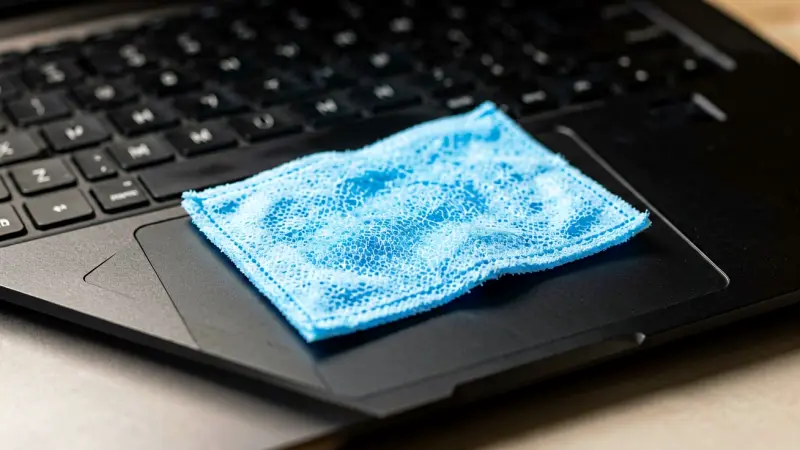
Beyond the active ingredients, the physical properties of the wipe itself pose risks. Clorox wipes are made from a non-woven fabric that is effective for cleaning but can be slightly abrasive or textured. Rubbing this fabric against a precision trackpad surface, especially if it contains dried-on grime or if the wipe is not perfectly clean, can scratch the delicate coating.
Furthermore, the moisture content in these wipes is designed to be substantial enough to kill pathogens on porous or semi-porous surfaces like bathroom tiles. A laptop trackpad, however, is a small, flat electronic component bordered by sensitive internal mechanics and often glass or plastic housing. Excess moisture can easily wick into the seams, button mechanisms, or underneath the pad, leading to short circuits, corrosion of internal contacts, or the disintegration of adhesive layers.
Specific Risks to the Trackpad and Laptop
Damage to the Surface Coating
Many modern ultrabooks and MacBooks use a glass trackpad with an anti-fingerprint or oleophobic coating. While glass is durable, the coating is not. Harsh chemicals can break down the molecular structure of these treatments.
Once the coating is compromised, the trackpad becomes much more prone to oil stains, fingerprints, and even sticky residues. This makes future cleaning significantly harder and can degrade the tactile feel of the device, making it feel rough or less responsive.
Moisture Ingress and Internal Corrosion
Laptops are engineered with specific tolerance levels for liquid. While a drop of water is usually fine, the concentrated moisture in a disinfecting wipe is a different story. If the liquid pools or seeps past the edges of the trackpad, it can reach the scissor switches, the sensor array, or the underlying circuit board.
Sodium hypochlorite is an electrolyte, which means it conducts electricity. If it comes into contact with live circuitry, it can cause a short circuit. Even if the laptop remains powered off, the presence of this liquid can lead to galvanic corrosion of the solder points and pin headers inside the laptop.
Residue and Streaking
Clorox wipes are formulated to leave a slight residue that maintains disinfecting properties for a period. On a trackpad, this residue can create a film that interferes with the capacitive sensors. The trackpad detects touch through changes in electrostatic fields.
A layer of non-conductive or inconsistent residue can dampen these signals, leading to erratic cursor movement, “ghost touches,” or a significant decrease in sensitivity. Cleaning up this residue often requires even more harsh chemicals, creating a vicious cycle of damage.
What Should You Use Instead?
For the vast majority of daily cleaning needs, you do not need a disinfectant. The skin on your hands sheds dead cells and oils, which is what typically makes the trackpad look dirty. These are not pathogens that require chlorine-based sterilization.
A simple, dry microfiber cloth is the gold standard for laptop cleaning. These cloths are fine enough to lift dust without scratching the screen or trackpad.
If the trackpad feels sticky or has oily fingerprints that won’t lift with a dry cloth, you can introduce a small amount of liquid. The safest bet is a solution of distilled water and a tiny drop of mild, fragrance-free dish soap. Dampen a corner of a microfiber cloth until it is barely wet, wring out all excess liquid, and then wipe the trackpad gently.
Avoid spraying the laptop directly. Alternatively, isopropyl alcohol (IPA) at 70% concentration is widely accepted by manufacturers for cleaning electronics, but it must be used sparingly and only on the cloth. Never let it drip.
For tougher stains, a dedicated electronic screen cleaner that is alcohol-free and ammonia-free is a safer choice than any household disinfectant.
Comparing Cleaning Methods for Laptops
To help you make the best decision for your device, here is a comparison of common cleaning agents and their suitability for laptop trackpads.
| Cleaning Agent | Effectiveness | Risk Level for Trackpad | Recommendation |
|---|---|---|---|
| Dry Microfiber Cloth | Low (Dust/Smudges) | None | Best for daily maintenance |
| Damp Cloth (Water/Mild Soap) | Medium (Oils/Grime) | Low (If used sparingly) | Safe for periodic deep cleaning |
| 70% Isopropyl Alcohol | High (Germs/Oils) | Low to Medium | Acceptable if diluted and applied to cloth only |
| Clorox/Disinfecting Wipes | High (Pathogens) | High | Avoid for electronics; use on keyboard only if necessary and diluted |
| Windex/Glass Cleaners | High (Streaks) | High | Do Not Use; contains ammonia and abrasives |
Notice that while disinfecting wipes are rated high for pathogen removal, their risk profile for electronics is also high. This is a critical distinction. If you are cleaning a bathroom sink, you want maximum germicidal power. If you are cleaning a laptop, you want minimum chemical exposure that still removes visual dirt. The requirements are fundamentally different.
When Is It Actually Okay to Disinfect a Laptop?
There are specific scenarios where sanitizing a laptop becomes a priority, such as when a household member is sick or after returning from a trip. In these cases, you are balancing the need for hygiene against the risk of hardware damage. The general consensus among IT professionals is that the keyboard is a more critical vector for germ transfer than the trackpad, simply because keys have crevices where bacteria can nest and because people type with dirty hands more frequently than they glide their palms over a glass surface.
If you must disinfect, focus on the keyboard first. For the keyboard, you can use a wipe with a mild disinfectant, but ensure it is not dripping wet. You may need to blot the key caps to remove excess moisture.
For the trackpad, stick to the alcohol-free or low-alcohol methods mentioned earlier. If you are forced to use a stronger disinfectant on the trackpad due to a specific health concern, dilute a small amount of a compatible disinfectant (like a hydrogen peroxide-based wipe, which is less corrosive than chlorine) into water, apply it to a cloth, and wipe quickly. However, this should be an absolute last resort, not a routine cleaning habit.
Common Mistakes to Avoid
Spraying Liquid Directly on the Device
This is the most common and damaging error. No matter how gentle the liquid is, spraying it onto a laptop allows it to flow into the sides of the chassis. The fan intake, speaker grilles, and port openings are vulnerable entry points for liquid. Always apply liquid to the cloth, never the machine.
Using Paper Towels or Napkins
Paper products shed fibers that can get stuck in the small gaps between the trackpad and the chassis, or worse, they can abrade the glass surface. Stick to high-quality microfiber cloths. They are cheap, reusable, and safe for most surfaces.
Ignoring the Manufacturer’s Guide
Every laptop has a specific maintenance guide. Some older devices used mechanical hard drives that were sensitive to magnetic fields, while modern solid-state drives are fine but still sensitive to static discharge. More importantly, some newer laptops use specific anti-glare or anti-oil coatings that react poorly to certain alcohols.
Always check your manual. If it says “use only a dry cloth,” that is a very strong indicator that the manufacturer has determined that moisture is a risk to their specific design.
Long-Term Maintenance Tips
Keeping your trackpad clean is about prevention as much as it is about cleaning. One of the best ways to avoid needing harsh cleaners is to wash your hands before using your laptop. This reduces the amount of oil and grime that gets transferred to the glass.
If you use your laptop in a kitchen or a workshop where you might encounter grease or dust, place it on a clean, dedicated surface rather than a cluttered desk.
Regularly wiping down your laptop with a dry cloth takes less than thirty seconds and prevents the buildup of grime that necessitates wet cleaning. This simple habit preserves the aesthetic and functional integrity of the device for years. Additionally, be mindful of what you consume near your laptop.
Spilled coffee or soda is a far greater threat to your trackpad and keyboard than bacteria ever will be. The risk of liquid damage from food and drink is significantly higher and more catastrophic than the risk of surface degradation from a rare disinfecting incident.
Frequently Asked Questions
Can I use a rubbing alcohol wipe on my trackpad?
Yes, but with caution. Isopropyl alcohol (IPA) is generally safe for electronics when it is in a concentration of 70% or lower and is applied to a cloth rather than the device. It evaporates quickly, reducing the chance of moisture ingress.
However, do not soak the cloth. If your laptop has a specific prohibition in the manual against alcohol, follow that instruction. For most standard consumer laptops, a lightly dampened cloth with 70% IPA is a safe and effective way to sanitize and clean the trackpad. This measured method is far safer than reaching for stronger household disinfectants. When in doubt, the gentler option almost always wins with electronics. This is the same practical thinking that shows up when people look for simple ways to keep their workspace functional and comfortable without overcomplicating things. Similar care applies when deciding how to handle other frequently touched surfaces around the home. People who think carefully about these small decisions often apply the same logic to other parts of daily life, such as how they manage their living or work arrangements.
Will a Clorox wipe damage my laptop screen?
It is highly likely to cause damage. Laptop screens are even more sensitive than trackpads. They typically have anti-reflective coatings that are very susceptible to abrasion and chemical breakdown. A Clorox wipe can leave permanent streaks, haze, or discoloration on a screen. Always use a dedicated screen cleaner or a dry microfiber cloth for your display. A little extra care here prevents the kind of permanent haze that is difficult to reverse later. Treating sensitive surfaces gently is part of the same mindset that helps people maintain other everyday items they rely on. Small, consistent habits like this tend to pay off over time.
How often should I clean my laptop trackpad?
For most users, a quick wipe with a dry microfiber cloth once a week or whenever you notice smudges is sufficient. If you work in a dusty environment or have pets that shed, you may need to do this more frequently. Deep cleaning with a damp cloth or mild solution is only necessary when the trackpad feels sticky or has visible grime that a dry cloth cannot remove.
Is it safe to use baby wipes on my laptop?
It is not recommended. Baby wipes often contain lotions, fragrances, or mild soaps that can leave a sticky residue on the trackpad. This residue will attract more dirt over time, making the surface feel worse than before. A plain, fragrance-free microfiber cloth is a superior choice for routine maintenance.
Final Thoughts on Laptop Hygiene
While the idea of using a powerful disinfectant on your laptop trackpad may seem appealing during times of high hygiene awareness, the chemical and physical properties of Clorox wipes make them a poor fit for precision electronics.
The risk of coating damage, moisture intrusion, and sensor interference far outweighs the benefit of killing surface bacteria on a device that is not a primary food preparation surface. Matching the cleaner to the material is a basic principle that applies to most of the equipment we use daily.
The same idea of choosing the right tool for the job appears in many practical guides on the site, including advice on keeping everyday equipment in good condition. By sticking to gentle, manufacturer-approved methods like microfiber cloths and mild solutions, you protect your investment while maintaining a clean and functional laptop.
The same thoughtful approach shows up when people choose practical upgrades for a budget-friendly home office and when they decide how to keep shared spaces functional over time. A little consistency goes a long way with both devices and the spaces we use them in.
The same steady habits help in many other practical areas of life, including how people approach everyday maintenance and organization (see also practical takes on keeping things simple and functional). The same mindset shows up in other practical maintenance habits people develop over time, whether they are caring for devices or organizing the places they work and live.